
Free for iPhone and Android
Your ERPNext, in your pocket
The ERPNext mobile app lets you approve requests, check the numbers and book orders from your phone. It's free on iPhone and Android, and you sign in with the same site address and login you already use.
- Free to download
- ERPNext v15 and later
- Your existing login
How to download the ERPNext mobile app and log in
The ERPNext mobile app is free on Android phones, iPhones and iPads. Download it from your phone's app store, then log in with your ERPNext site address, username and password.
- Android phones and tabletsGet it on Google Play (opens in a new tab)
- iPhone and iPadDownload on the App Store (opens in a new tab)
Download the app
On an Android phone, tap "Get it on Google Play". On an iPhone or iPad, tap "Download on the App Store". Then install the app. It's free.
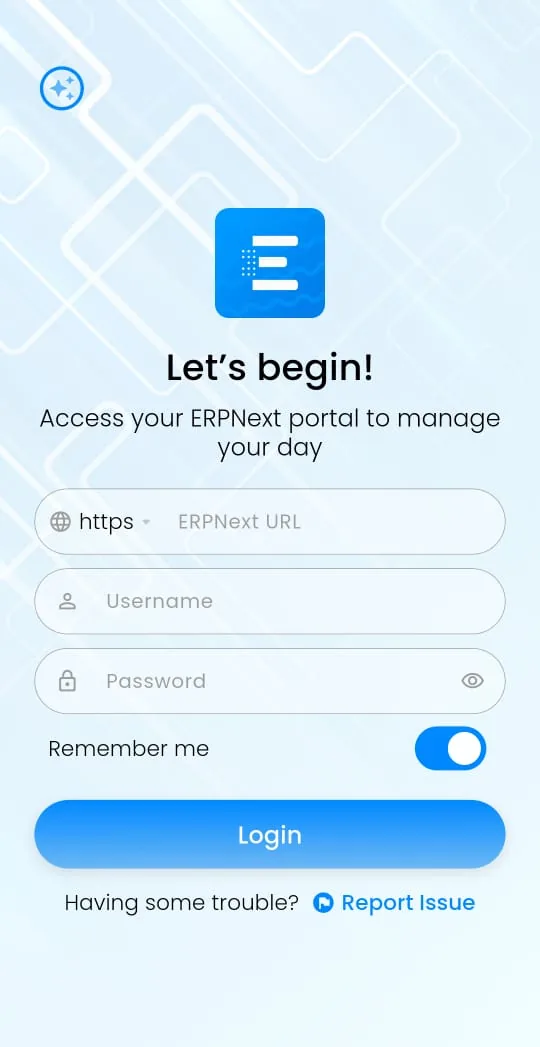
Enter your ERPNext URL
Leave "https" selected and type your site address without "https://", for example yourcompany.erpnext.com.
Enter your username and password
Use the same login you use in the browser. This is usually your email address.
Tap Login
Keep "Remember me" switched on so you stay signed in. If your account uses two-factor authentication, enter the code when asked.
Who uses it
Managers: approvals on the move
You get a notification when a purchase order, leave request or expense claim needs you. Open it, check the details and act on it without waiting until you're back at your desk.
CEOs and owners: reports wherever you are
See the dashboard overview and open the reports you check every day, such as sales, receivables and stock, from your phone or tablet. You can download reports as PDF files to share.
Field sales teams: orders at the customer's door
Sales reps can create a sales order during the visit, check the customer's details and send the order straight into ERPNext Sales & CRM, so the warehouse can start on it the same day.
What the app gives you
- Dashboard overview: Your key numbers when you open the app
- Access to every module: Open the modules your role allows
- Real-time notifications: Push alerts for things that need your attention
- Documents and files: View documents and download files and PDFs
- Task tracking: Keep up with tasks assigned to you
- Secure sign-in: Two-factor authentication is supported
- Phone and tablet: Works in portrait and landscape
Your permissions still apply
The ERPNext mobile app signs in as your normal ERPNext user. A sales rep sees what a sales rep sees in the browser, and a manager sees what a manager sees. Roles, approval workflows and user permissions all carry over to the phone, so you don't set anything up twice. Read more about how we protect your ERPNext data.
Mobile app questions
How do I download ERPNext on my mobile?
Open Google Play on Android or the App Store on iPhone and iPad, and install the free ERPNext mobile app from the links on this page. Then log in with your site address, username and password.
Is there an ERPNext app for Android?
Yes. The free ERPNext mobile app is on Google Play for Android phones and tablets.
Is there an ERPNext app for iPhone and iPad?
Yes. It's free on the App Store for iPhones and iPads on iOS 15.6 or later.
What do I enter in the ERPNext URL field?
The web address you use to open ERPNext in your browser, without "https://", for example yourcompany.erpnext.com.
I can't log in. What should I check?
Check the site address for typos, then make sure your username and password work in the browser. If you're an iREX hosting client, contact our support team.
Is the ERPNext mobile app free?
Yes. It's free to download on Google Play and the App Store.
Which ERPNext versions does it support?
ERPNext and Frappe version 15 and later.
Does it work with iREX hosting?
Yes. Any ERPNext site you can reach with a web address works, including sites on our managed ERPNext hosting.
Is it an official Frappe app?
No. It's an independent app built for ERPNext users. You sign in with your own ERPNext account, and your data stays on your ERPNext server.
Can my whole team use it?
Yes. Each person signs in to the ERPNext mobile app with their own ERPNext user.
Trusted by 10+ businesses
10+ businesses across Pakistan run their daily operations on ERPNext set up by iREX.







Book a free consultation
Let's see if ERPNext fits your business
A 30-minute call to understand how your business runs today and what ERPNext should do for it. You leave with a clear scope, a rough timeline and a quote range.
10+ businesses run on ERPNext with iREX. Remote support Monday to Saturday, 10 AM to 7 PM (PKT).